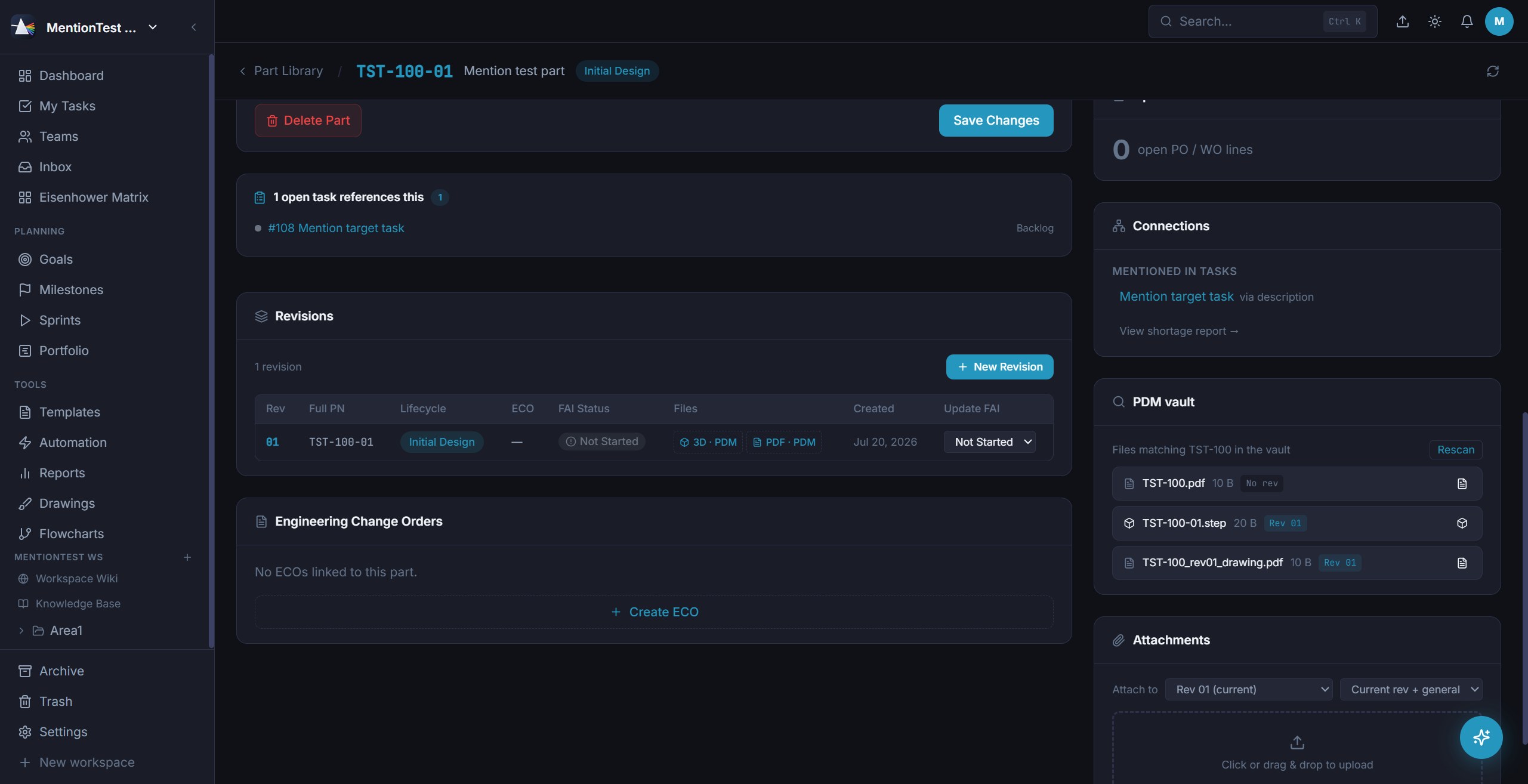
Every other tool makes you keep the plan in one place and the product in another. Prism holds both - tasks, sprints and timelines next to parts, revisions, ECOs and BOMs
A prism doesn't add anything to light - it separates what was already there. Prism does the same to your work: one source of truth, refracted into the view that fits the question you're asking.
Turn it on per workspace. The marketing team's workspace never sees a BOM.
Prism assigns revision strings for you - letters in production, numbers in development. Changing lifecycle demands an ECO. Reaching production demands a passed or waived FAI. The rules are the product, not a wiki page nobody reads.
See the whole module →The STEP model and drawing PDF you open always match the revision you're looking at. Prism also scans your PDM folder and matches files by part number, so the vault stays the source of truth.
Multi-level and collapsible, shaped like the assembly tree your CAD system already exports. Sub-assemblies expand in place, extended cost rolls up the tree, and the shortage report tells you which lines aren't covered by stock or an open PO.
Standup notes, a supplier email, a page of scribbles. Prism reads it, decides what's a task, what's a subtask, what belongs in the wiki and what's just a note - then shows you its work before anything is created.
Drop a .eml or .msg and the supplier's late-delivery email becomes a task with a due date and a checklist.
Describe an outcome - "qualify a second supplier for the housing" - and get a subtask tree you can edit before it exists.
Three of the major hosted model APIs are supported, plus running the models inside your own cloud account so prompts never leave your boundary. Bring the provider you already trust, or leave AI switched off entirely.
Two memories, two jobs. The wiki is the blank page you keep on purpose. The Knowledge Base is the audit trail you never have to maintain - every completed task and its files, filed automatically as the project story.
Mirror the whole thing to a folder of Markdown files on disk if you want your history in plain text, forever - readable in any Markdown notes app, or in a text editor.
Seats fall from $100 to $55 as the team grows, in brackets - nothing you already hold gets repriced. Service and guarantee is $125 a month for the company. All prices USD and exclusive of VAT, which is added at checkout.
These are our standard list prices — we could not reach our pricing service just now, so they may not be current. The quote you are shown at checkout is the price you pay. Ask us for a quote.
Progressive brackets: 1-5 at $100, 6-10 at $80, 11-20 at $65, 21+ at $55. Plus $125 a month service for the whole company.
Get startedVolume seat pricing, annual licensing and invoicing, managed seat control, migration from your current tools and onboarding - handled directly by the team behind Prism.
Prism ships as software you run on your own hardware. A hosted version is not built yet - we are counting the teams who want one before we commit to it. Tell us and it moves up the list.
Prism runs on any machine on your network - a spare desktop is genuinely enough. If you'd rather not provision one, we'll send a small fanless server with Prism already installed and configured. Plug it into your switch and the team is on.
Prism installed and licensed, HTTPS on your network, a fixed hostname, scheduled backups to a drive you nominate, and your PDM folder mounted so the vault scan works on day one.
Seats are still priced the same per month. The hardware is yours outright, not a subscription, and your data stays on your premises. Skip it entirely and nothing about the product is different.
Every Prism today runs on hardware you control. A hosted version is on the list, not in the product - so rather than guess, we are counting the teams who would use one. One line from you is the whole vote.